
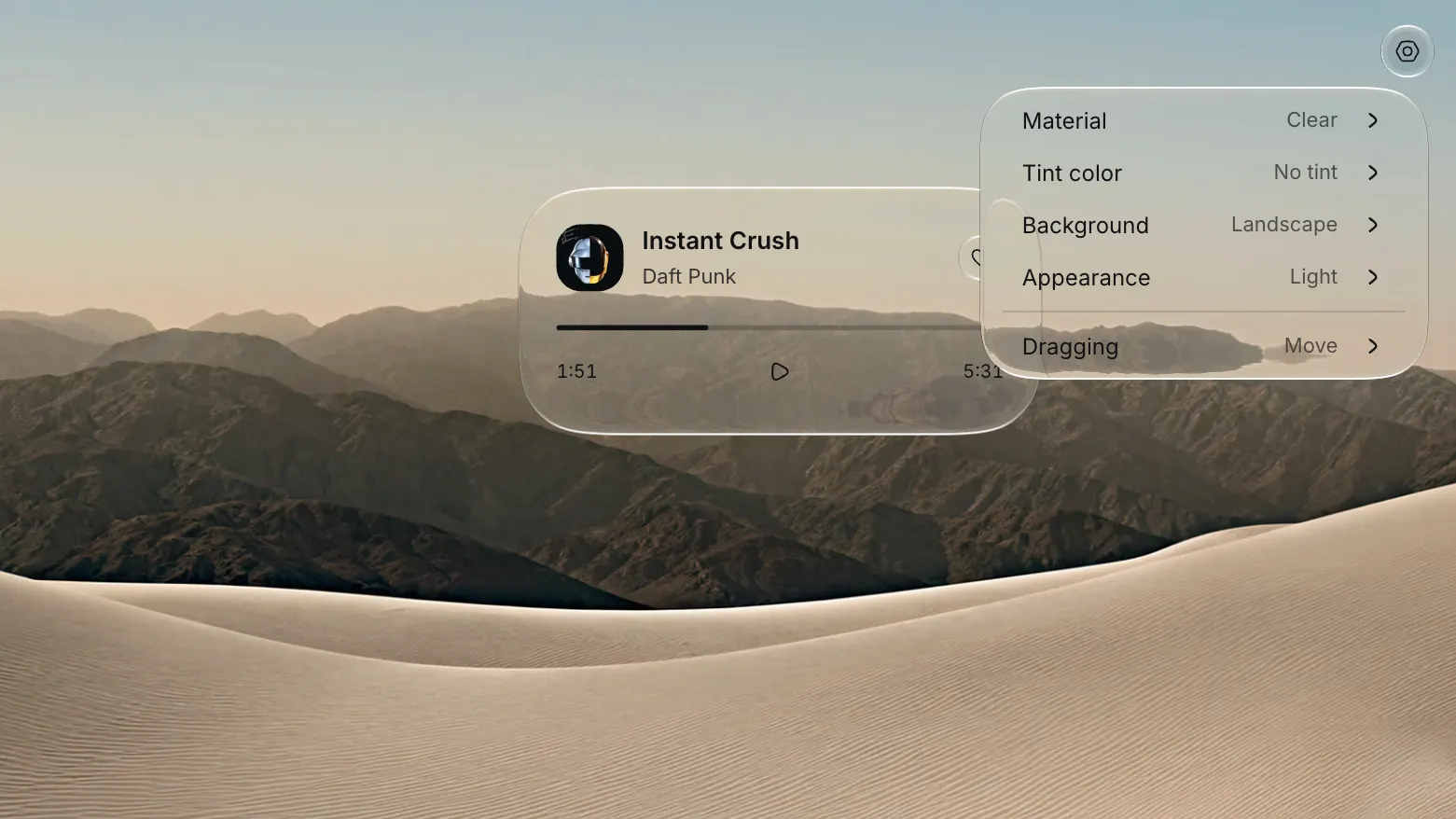

You want the interface to feel like glass, where the surface bends what sits behind it and the controls stay legible on top. Most web glass stops at a translucent panel and a backdrop blur. Liquid Glass goes a step further and refracts the content behind every surface in real time, so a button over a photo bends the photo the way materials do on Apple platforms.
What Liquid Glass actually does
Liquid Glass is an open source library that renders glass surfaces and controls for React on the web and in Electron. Each surface reads the live DOM behind it, displaces that content through a refraction value, and keeps text and icons crisp on top. Two materials cover the range: Clear for a light, transparent look, Regular for a denser frost. Both support light and dark appearances, and the tint prop colors the glass without changing the label.
The set is not a folder of static images. Buttons, toolbars, and tabs all respond to pointer and keyboard input. Standard props and refs stay available, along with accessible names and state callbacks, so the components drop into an existing app without a rewrite.
Why live refraction beats a CSS blur
Glassmorphism on the web usually means backdrop-filter: blur() over a semi-transparent fill. That reads as glass until the layout moves. The blur is uniform, so it ignores the shape of the light and the depth of the content behind it. A card over an image looks the same whether that image is bright or dark.
Liquid Glass samples the content behind a surface and bends it. That displacement is what gives the material its thickness. Edges pick up a soft highlight, nested surfaces limit their refraction to the parent inset, and the content under the glass stays live instead of turning into a flat panel.
How it renders glass on the web
The library splits the work between the GPU and SVG filters. WGSL shaders render material maps, and SVG filters apply those maps to live DOM content. Maps are cached and reused as surfaces move, and a geometry change prepares a new map. The library never captures a screenshot, so a video or a chart keeps animating underneath a glass surface, and so does a canvas.
The same scene model works in React and outside it. In React you wrap content in GlassScene and GlassContent, then place surfaces on top. Outside React, createGlassScene from the /dom export builds the same structure by hand, so a plain page or a small Electron shell can use it too.
How materials and motion work
Defaults live on GlassScene, and any surface can override them. The props that shape the look are small in number:
material→"clear"or"regular"appearance→"light"or"dark"radius→ corner radius in pixels, or"capsule"and"circle"refraction→ displacement in pixels, default60tint→ a six-digit hex color for the glass alone
The motion prop accepts "full" or "reduced", and "none" for a hard stop. System reduced-motion preferences always apply. The fluid prop animates the outline when a layout dimension changes, and morphFrom lets a surface open from the shape of another element. Override styles with className or the --lg-foreground variable when text and icons need to shift.
What ships in the box
The package covers the controls most interfaces need, all on the same material system:
GlassSceneandGlassContentfor the scene and its live background layerGlassSurfaceandGlassButtonfor containers and buttonsGlassToolbarwith buttons and links, plus groups and a spacerGlassTabswith a moving selection indicator, plus a composable root and panel setGlassMenuwith submenus, plus focus restoration and positioningGlassSliderandGlassSwitchfor inputGlassProgressiveBlurandGlassScrollEdgesfor scroll context
Foreground content that should refract under a higher surface uses GlassForeground or the useGlassForeground hook. Geometry helpers like GlassShape and GlassCorner keep nested corners concentric without a scene.
What it needs to run
The React components require React 19 or newer. Rendering the material maps needs HTTPS or localhost and an available WebGPU adapter, while progressive blur works without WebGPU. The project tests against Chromium and Firefox, with Safari and Electron on the same list, and performance differs between them. Safari can take longer to filter large content layers, so test animated menus on the devices you support.
A scene holds up to maxSurfaces, which defaults to 16. NodeNext TypeScript consumers need skipLibCheck: true for the upstream vgpu declarations. For clean refraction in Safari, give GlassContent an opaque background. The project is MIT licensed.
Frequently asked questions
Do I need WebGPU to use it?
Only for the glass material maps. Progressive blur renders without WebGPU, so a scene that leans on blur alone runs on more machines. When a material map cannot be prepared, the content stays readable and onDiagnostic reports the error.
Does it work outside React?
Yes. The /dom export exposes createGlassScene, and the lower-level exports give you geometry and rendering APIs for custom integrations. React is the shortest path, not the only one.
Will it look the same in every browser?
Close, but the engines differ. Firefox draws each surface as its own filtered layer, and Safari can spend more time filtering large layers than Chromium. The materials and motion settings stay the same across browsers, so the look holds while the performance varies.
Is it free for commercial work?
Yes. Liquid Glass is MIT licensed, so you use it in personal and commercial projects without paying anyone or asking permission.
Why it belongs in your stack
If you already want glass in your interface, this saves the weeks you would spend writing shaders and SVG filter graphs from scratch. You install one package, import one stylesheet, then wrap a scene. The controls arrive accessible through Base UI, the motion respects user preferences, and the material reads the live page instead of a frozen copy.
It pairs with the reading on this site. The practical guide to liquid glass covers the visual language, and the liquid glass vs glassmorphism comparison explains where the plain blur falls short. When you want the rest of the interface to match, the other free code resources and design and code kits are built for the same fast, solo workflow.


.webp)


