
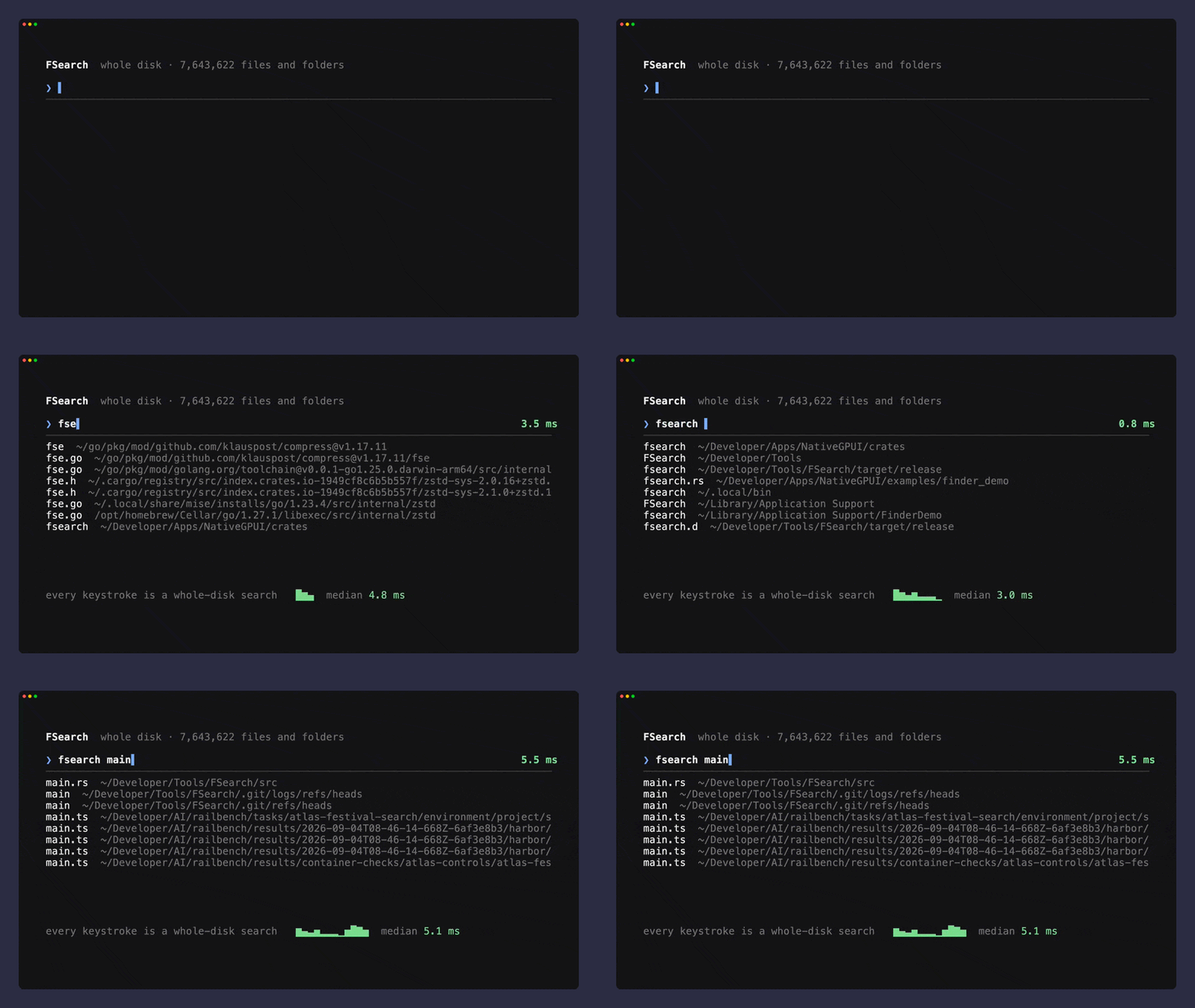

Spotlight finds the app. It rarely finds the file you half remember from six months ago, and it does not search inside anything unless the indexer already decided you cared. fsearch is a small Rust tool that indexes the whole disk once and then answers name and content queries in about a millisecond.
What fsearch actually does
fsearch indexes every file and folder on your Mac, then answers queries against that index. It matches names with fuzziness, so a typo does not kill the search, and it searches inside text files through a trigram index. You drive it from the terminal as a CLI, and the same engine ships as a Rust crate you can link into your own project.
The author built it for one machine and reported the numbers honestly. On an M4 Max with 7.7 million files on disk, a whole-disk name search lands at p50 1.3 ms, content search at p50 9 ms, and a new or renamed file shows up in about 0.1 s. The first crawl takes around 20 s, once. The daemon holds between 30 and 135 MB of memory. Those are the author’s figures from the README, measured on one disk, so treat them as a strong signal and not a promise for every Mac.
Why Spotlight leaves gaps on a full disk
Spotlight is built for launching apps and surfacing a few document types. It respects the folders Apple marks private, and it leaves plenty of developer directories out of reach. The result is a search that works until you need it most, when the file is inside a node_modules tree or a build folder you named badly last spring.
fsearch takes the opposite stance. With Full Disk Access it indexes everything it can reach. The README is upfront about the trade: it skips some file types and the build and vendor folders, which is why its competitor scans roughly 9% more file contents. You trade a little coverage for speed and a small memory footprint.
- ❶ Name search across the whole disk, past the apps and documents other indexers watch
- ❷ Fuzzy matching that still finds the file when you misspell it
- ❸ Content search inside text files, kept fresh from disk
How the index stays fast
The first pass crawls the disk with a bulk directory read, then fsearch keeps up with changes through the filesystem event stream. A restart replays only what changed instead of crawling again, so the 20 s cost is paid once and not on every boot.
Names live in a single memory-mapped file laid out folder by folder, so a folder filter is a range read, and each distinct name is scored once. Content search runs on a trigram index of your text files, and the matches themselves are read fresh from disk. That last detail matters: an index that caches file bodies goes stale the moment you save, and fsearch sidesteps it by storing positions and reading the bytes live.
| What is measured | Result (author’s M4 Max, 7.7M files) |
|---|---|
| Find a file by name, whole disk | p50 1.3 ms |
| Search inside files | p50 9 ms |
| A new or deleted file appears | about 0.1 s |
| First crawl of the disk | about 20 s, once |
| Daemon memory | 30 to 135 MB |
The query language worth learning
You type a few words and add filters when you need them. The syntax is small enough to hold in your head:
fsearch "readme in:~/Developer"searches inside one folderfsearch "type:image size:>5mb mtime:<7d"narrows by kind, size, and agefsearch "ext:rs regex:fn\s+\w+_dir"runs a regular expression inside file contentsfsearch "sym:apply_dir"jumps to where a symbol is defined
Words are fuzzy by default, and a word of five letters or more forgives a single typo, so mian.rs still finds main.rs. You can force exact matching or pin the start and end of a name with ', ^, and $, and exclude with !. The filter set covers extension, type, kind, folder, size, modification time, path, and the content search modes. Content search is smart-case, which is the behavior you want and rarely have to think about.
The one permission it needs
fsearch can only be as good as the access you grant it. Started from a terminal that already has Full Disk Access, it indexes everything. Set up as a login item, you give the binary its own grant in System Settings, under Privacy and Security, and you grant it again after each rebuild, because the signature changes.
When access is missing, fsearch skips the protected folders instead of hanging on a permission prompt mid-search. That restraint matters: a search tool that stalls on a dialog is worse than one that quietly returns what it can see.
Three ways into the same index
There are three ways in. The CLI is the daily driver. The crate lets you embed the engine in a Rust program with a couple of calls. The socket lets any process talk to the running index over JSON lines, so a script, an editor plugin, or a small app can query the same data the CLI uses.
Linking the crate is short:
Engine::startopens the index for your home directoryQuery::parseturns a query string into a structured queryengine.searchreturns the hits
One index serves every caller. The first process to start owns it, and the rest follow along, so an app and the CLI never fight over two copies of the same data. If you also live in a terminal all day, the notes on designing a command palette cover the keyboard-first habits that pair well with a fast query engine.
Frequently asked questions
Is fsearch a replacement for Spotlight?
It covers the file-search job better than Spotlight in most cases, because it indexes the whole disk and searches inside files. App launching and document previews stay with the system. Many people keep Spotlight for launching and use fsearch for finding.
Does it work only on macOS?
Yes. fsearch is built for macOS and leans on Apple filesystem APIs for the crawl and the change stream. The README compares it against a competitor on a Linux kernel folder, but the tool itself targets the Mac.
Will it index my node_modules and build folders?
It deliberately skips some file types and the build and vendor folders to keep memory small and searches fast. The README states this openly as the reason a competitor covers about 9% more file contents.
How much memory does the daemon use?
Between 30 and 135 MB, depending on how much the index holds, according to the README. That is the footprint for watching a whole disk, which is small next to the alternative of a heavy background indexer.
Can I embed it in my own program?
Yes. The same engine ships as a Rust crate, and there is a JSON lines socket for callers that are not Rust. An app and the CLI share a single index, so you can build on top of the running search without starting a second crawler.
Why it belongs in your toolkit
The cost of a slow search is attention. Every time you cannot find a file, you leave the task to open a terminal or a Finder window and hunt through folders. A query that returns in about a millisecond removes that detour, and the detour is where the afternoon goes.
fsearch is a small MIT-licensed Rust tool, and it is honest about what it skips. You get one install and a query language that scales from a single word to a filtered content search. Grab the repository, run the install once, and give it Full Disk Access. When you want the files it surfaces to sit in a tidy project, the rest of our free resources and design and code kits are built for the same fast, solo workflow.


.webp)


